2

Assigning different temperature schedules to different zones

How can I simulate and setup different temperature schedules for different thermal zones or spaces?

I have a small residential building setup with 4 stories and I would like to check what difference in gas usage it makes if you keep some parts of the building semi-conditioned (15°C / 59°F) instead of letting it run with the default building thermostat.

Wim's avatar
109
Wim
asked 2015-03-02 07:39:52 -0600
__AmirRoth__'s avatar
4.4k
__AmirRoth__
updated 2017-05-03 19:17:12 -0600
edit flag offensive 0 remove flag close merge delete

Comments

1

Welcome @Wim. In addition to subject, e.g., 'thermal-zones', please tag your question with the software you are using, e.g., 'openstudio' or 'ies-ve' or 'equest' so that the right users get notified by email.

__AmirRoth__'s avatar __AmirRoth__ (2015-03-02 07:54:29 -0600) edit

Thank you for your comment Amir. I've added some tags. I'm real newby and being dutch doesn't help much ( in this case ;))

Wim's avatar Wim (2015-03-04 05:46:44 -0600) edit
add a comment see more comments

1 Answer

3

You need to go to the "schedule" tab and create the schedules you want to use.

Then assign those schedules under the relevant tabs:

  • "Facility" tab: you can assign the loads and infiltration schedules there.
  • "Thermal Zones" tab: you can define the HVAC schedules there (heating, cooling, humidifying, etc)

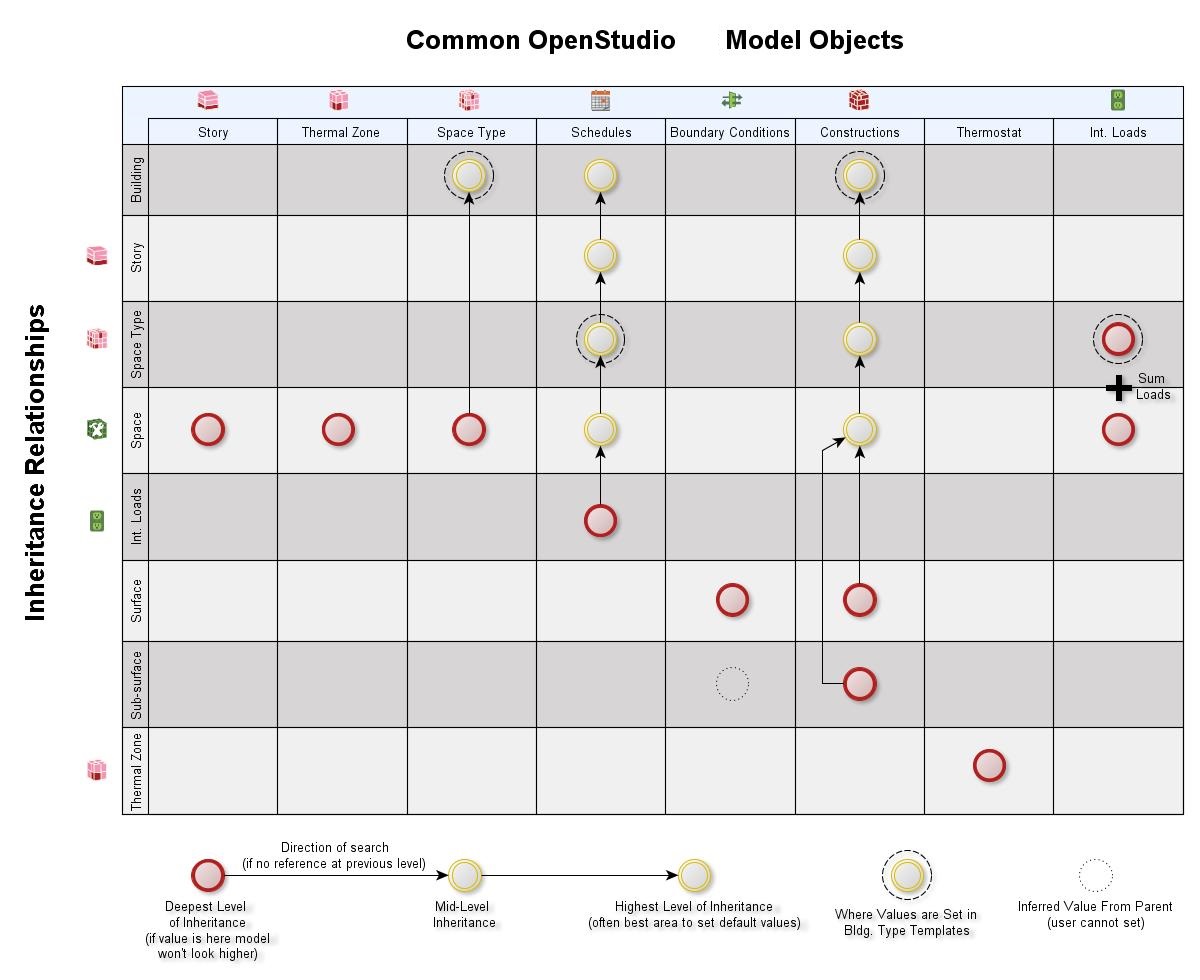
OpenStudio aims to make this process as painless as possible for you, so that you don't have to manually set all schedules for each space for example. Therefore there is a notion of "inheritance".

For example, you can create a "Space Type" object that will have a default schedule set (People, Load, etc). Later on, under the facility tab you can just specify that one Space, or an entire story or even building, is of this Space Type and it will inherit the default schedules for those. And you can just overwrite some of these if need be.

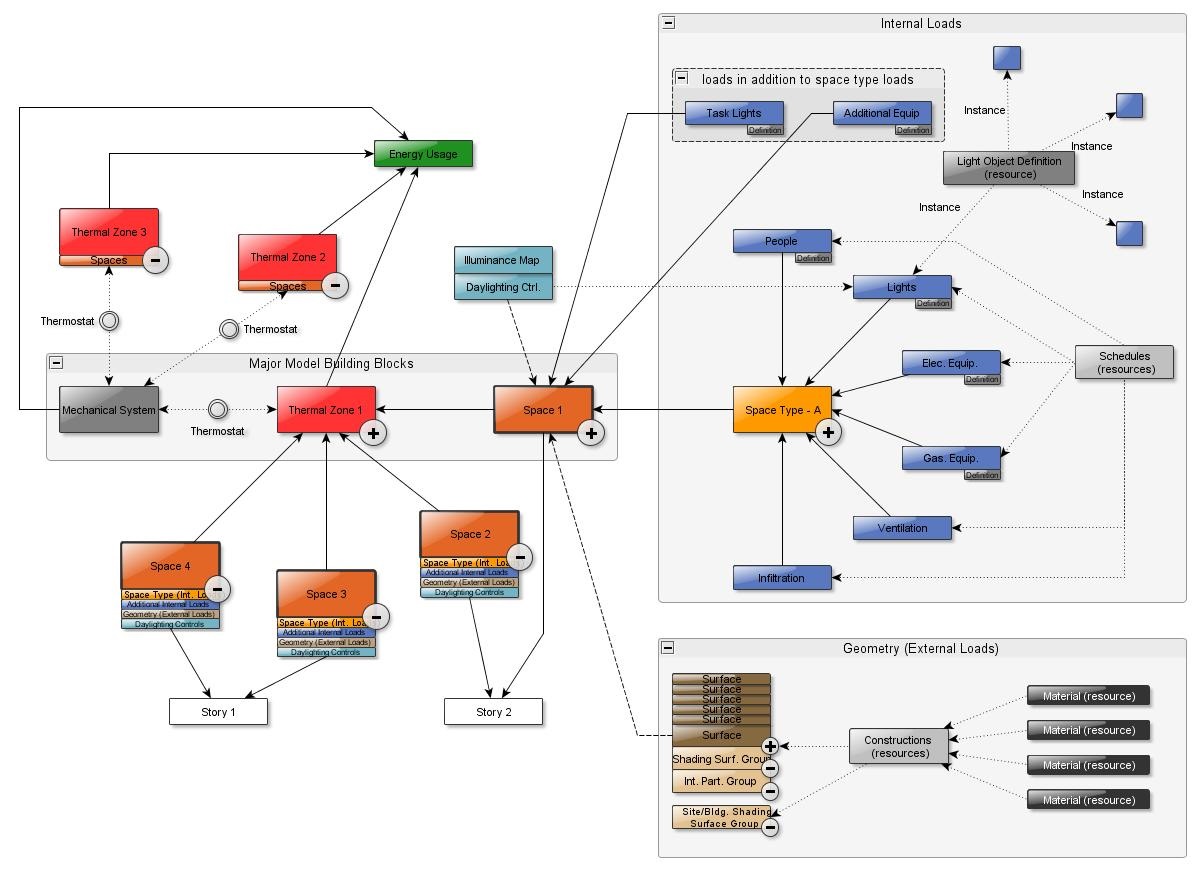
To read up more on inheritance, you can go read Overview of OpenStudio Model Objects. It dates from version 0.6 but it should be still relevant. It has got nice figures to help you understand what is going on:

Relationship diagram

OpenStudio Relationship diagram

Inheritance

OpenStudio Inheritance

Julien Marrec's avatar
29.7k
Julien Marrec
answered 2015-03-04 06:40:52 -0600, updated 2015-03-04 06:44:56 -0600
edit flag offensive 0 remove flag delete link

Comments

1

Thank you that answers my question. I didn't know how to create new schedules, but I see that's not too hard to do, thanks a lot.

Wim's avatar Wim (2015-03-04 08:49:52 -0600) edit

@Julien, setting those schedules works and assigning those schedules works as well, but as soon as you run the simulation the schedules are set back to one schedule. Is there another way to make it work ?

Wim's avatar Wim (2015-03-13 02:26:53 -0600) edit

@Wim I'm confused. Would you share your model so that people can try to see what's going wrong?

Julien Marrec's avatar Julien Marrec (2015-03-13 09:15:41 -0600) edit
1

I think I found it, I have setup a Parent's thermostat in Sketchup openstudio plugin. Then I couldn't find that back when I started working in OpenStudio directly and didn't understand why all thermostats were setback all the time. When implementing a HW baseboard convective water unit with as HW boiler I started to rethink this and got it to work now, results start to make sense again, thank you for the response Julien.

Wim's avatar Wim (2015-03-13 10:18:59 -0600) edit

Glad you worked it out!

Julien Marrec's avatar Julien Marrec (2015-03-13 14:23:30 -0600) edit
add a comment see more comments